Itsy bitsy teeny weeny
The nano arrived today to much grinning and gaping (mine); a 4GB white model; and I’m still in awe. Seeing as my last iPod was a 1GB Shuffle, and prior to that a 20GB ‘Classic’ 3G (as Andy has taken to calling them), I hadn’t done the whole color-screen thing before; nor had I really done the whole click wheel thing; nor had I done any of the other things that have been done since last I did a done do. Moving on… 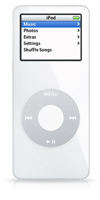
Take a standard 3"×3" Post-It note and fold it in half. Now tape some coins in there to add a bit of weight to it. There. That’s basically your iPod nano. Some thoughts:
- The headphone jack in bottom is a little strange to my eyes (and hands, for that matter), but it’s pretty obvious why it’s there: the jack wouldn’t fit up top. Considering the iPod itself is only ¼" deep, a ⅛" stereo jack would leave no room for the LCD. You could always shift the display south, but the end result would be a massive ½" bezel. Long story short: accommodating headphones up there would have yielded a much chunkier iPod, and we wouldn’t have any lanyard headphones either.
- Photo functions are all very nice, but honestly: what good are they without AV out, or camera connector compatibility? I know, I know… space limitations, both physical and practical (considering the storage capacity), but barring those what I’d really like is to be able to change the ratings on my photos and have them synced back to the iPhoto library… that’d give me something to do with the photos besides scrolling through them really fast.
- Scrolling through my photos really fast, I keep expecting to have to wait for the unit to fetch photos from hard disk and plunk them into RAM. No such luck; not even the slightest wait. Ain’t flash memory cool?
- My god this bastard is small. I mean honestly.
- This is my first color-screen iPod, so maybe I was expecting things to have changed a little since the Classic days, but how is it that the Contacts and Calendar features aren’t happy little clones of the Mac OS X Address Book and iCal? Why aren’t the more obscure Address Book fields (like spouse) supported? Or a contact’s photo? Why doesn’t the iCal location field get synced? It’d be kinda nice to know where my appointments are. As I recall, this was supposed to be the advantage of Apple creating ‘the whole widget’ — seamless integration.
- Initially I resented my Shuffle for its inability to play exactly what I want, when I want it. This was short-lived, as eventually I did like the marketing said and gave chance a chance, but the nano gives me a few more options. It’s still much too small to accommodate my entire music library, but I’ve set it up with a 2GB haven’t-heard-it-lately playlist for shuffling, topping it up with whatever albums I feel like listening to explicitly this week. It’s a nice mix.
- The thing is tiny. I shit you not.
- Several BusinessWeek articles (1, 2) attribute a rather foreboding quote to Clayton Christensen, effectively declaring the nano a gamble in its role as the ‘replacement mini’ and suggesting that size is perhaps not the dimension of improvement the market is craving. I agree with him —it is a risk— as people will no doubt be disappointed by the reduced cost/storage ratio and a lack of colors to choose from, but it’s entirely besides the point. The nano is the unit that finally fulfills the mini’s original premise: it goes after the high-end flash market, and it does it spectacularly. While its diminutive form may not be enough to swing people from larger hard disk players, migrating from another flash player to the nano is an incredible step up. It is, hands down, best in class.
And that’s that.
Further thoughts
- The iPod’s Notes feature is, and always has been, a completely bunk implementation. Why is there an arbitrary 4KB limit to my notes? Why do I have to enable Disk Mode to add notes when I could just as happily drag text files to the iTunes source list? Questions, questions.
- My nano’s name is Monte; succeeding former playthings Bingo and Bailey.
- I never used the Hold switch on my Shuffle (where by “switch” I mean “press and hold Play/Pause for three seconds”) because the time taken to switch it on and off was a complete hindrance in the “uh oh, somebody’s trying to engage me in conversation, better kill the music” situations I often found myself. Leaving it off Hold, however, meant I hit buttons by mistake pretty frequently: fumbling in my pockets, sitting down, etc. The nano’s Hold switch, although much more useful, still doesn’t see any use. Why? Because it’s up top. With the nano upside-down in my coin pocket (hey, the headphone cable has to come out somewhere, and I ain’t cutting my jeans), the switch is deep inside the pocket. Thankfully, there is very little mistaken button pressing going on, so I’m happy enough without it.
- I have a ridiculous aversion to clutter in top-level menus; I’m currently set with Music, Photos, Extras, and Settings. Nothing more. The thought of having a scroll bar in the top menu irks me something fierce.
- A habit I developed using mobile phones that doesn’t carry over to the iPod: pressing and holding Menu to take me to the top level menu. Doesn’t work here. Instead, I have to hit Menu once for each level I’ve drilled down through. I know it never did this, not even back in the Classic days, but it seems pretty damned sensible to me.
- One more time: bejesus it’s small. A comfortable and secure fit in the coin pocket of my jeans.
- Ars should’ve tested putting their nano in the back pocket of a tight pair of jeans and sitting down on a park bench, or getting into a car. Seems like the kind of scenario that will really turn up —more than dropping it from a car window at 50mph— and tests a dimension of stress they didn’t seem to touch on.
- Autofill really shouldn’t be a feature limited to Shuffles, it should come up for any iPod whose capacity is less than your music library. I mean come on, what could make more sense than that?